> ## Documentation Index
> Fetch the complete documentation index at: https://wiki.lipanet.com/llms.txt
> Use this file to discover all available pages before exploring further.
# TR-069 / ACS
> Monitor CPEs, provision the ACS management network on a MikroTik, and decide what customers may change on their own router.
# TR-069 / ACS
TR-069 (CWMP) lets your CPEs call home so the portal can read their parameters and queue actions. LipaNet runs its own ACS: every ISP gets an isolated tenant with a stable inform URL, and each router gets its own management VLAN, DHCP scope and NAT rules that never touch your customer traffic.
**Navigate to:** Sidebar → **Networking** → **TR-069 / ACS** → **Dashboard**
 ***
## The dashboard
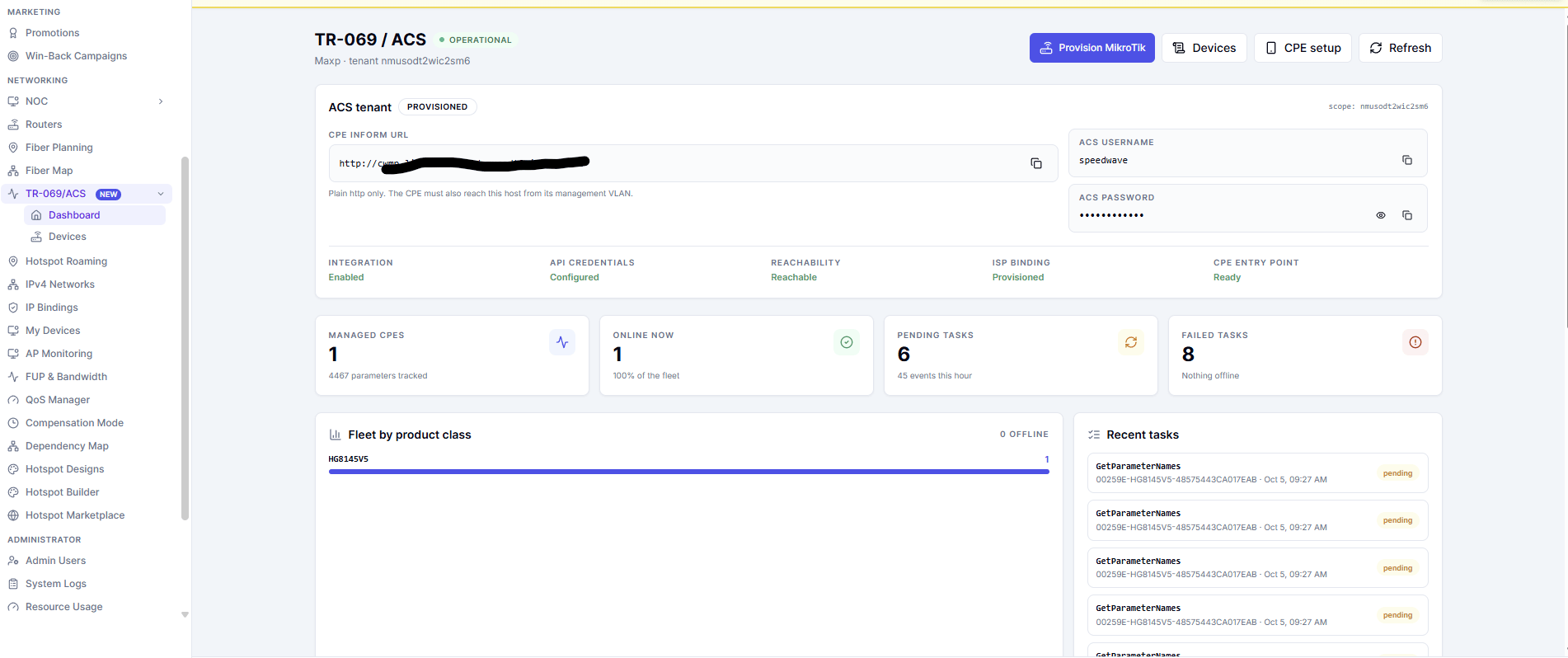
The header shows whether TR-069 is enabled and whether the ACS answered. Below it, the **ACS tenant** card holds everything a CPE needs:
| Field | What it is |
| - | - |
| **CPE inform URL** | The per-tenant ACS address (for example `http://cwmp.lipanet.com/t//acs`) |
| **ACS username** / **ACS password** | The credentials the CPE sends when it connects |
| **Core checks** | Live state of the tenant, the connection and the last inform |
The inform URL is **http only**. CPE firmware has no CA bundle, so an `https://` URL fails the TLS handshake and the device goes offline with no visible error.
Under the card you get the fleet view:
* **Managed CPEs**, **Online now**, **Pending tasks** and **Failed tasks**.
* **Fleet by product class** — how many CPEs of each model have informed.
* **Recent tasks** — the actions queued for devices and their status.
* **Recent CPE events** — informs, faults and parameter changes.
***
## The dashboard
The header shows whether TR-069 is enabled and whether the ACS answered. Below it, the **ACS tenant** card holds everything a CPE needs:
| Field | What it is |
| - | - |
| **CPE inform URL** | The per-tenant ACS address (for example `http://cwmp.lipanet.com/t//acs`) |
| **ACS username** / **ACS password** | The credentials the CPE sends when it connects |
| **Core checks** | Live state of the tenant, the connection and the last inform |
The inform URL is **http only**. CPE firmware has no CA bundle, so an `https://` URL fails the TLS handshake and the device goes offline with no visible error.
Under the card you get the fleet view:
* **Managed CPEs**, **Online now**, **Pending tasks** and **Failed tasks**.
* **Fleet by product class** — how many CPEs of each model have informed.
* **Recent tasks** — the actions queued for devices and their status.
* **Recent CPE events** — informs, faults and parameter changes.
 If the banner says TR-069 is disabled or the ACS could not be reached, no CPE will ever appear. Ask your platform administrator to enable TR-069 and set the ACS URL and API token on the orchestrator.
***
## Devices
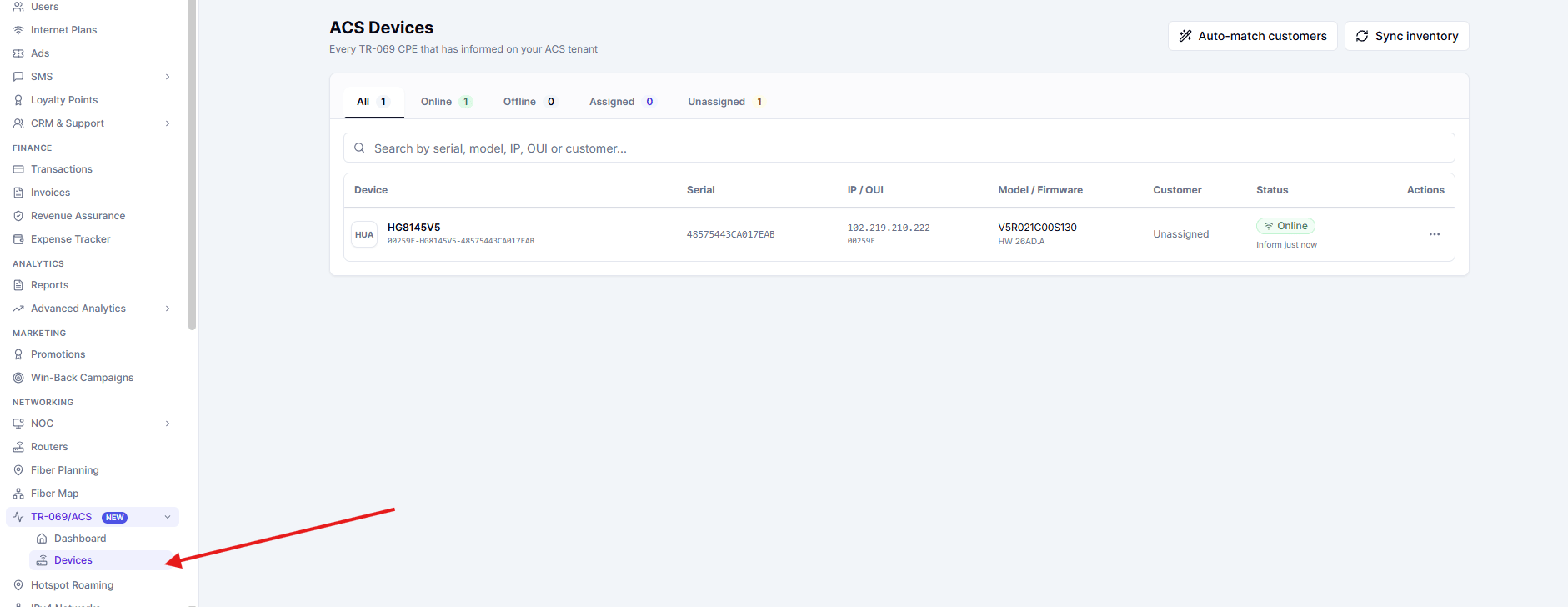
**Networking** → **TR-069 / ACS** → **Devices** lists every CPE that has informed. Click a row to open that device by its id.
If the banner says TR-069 is disabled or the ACS could not be reached, no CPE will ever appear. Ask your platform administrator to enable TR-069 and set the ACS URL and API token on the orchestrator.
***
## Devices
**Networking** → **TR-069 / ACS** → **Devices** lists every CPE that has informed. Click a row to open that device by its id.
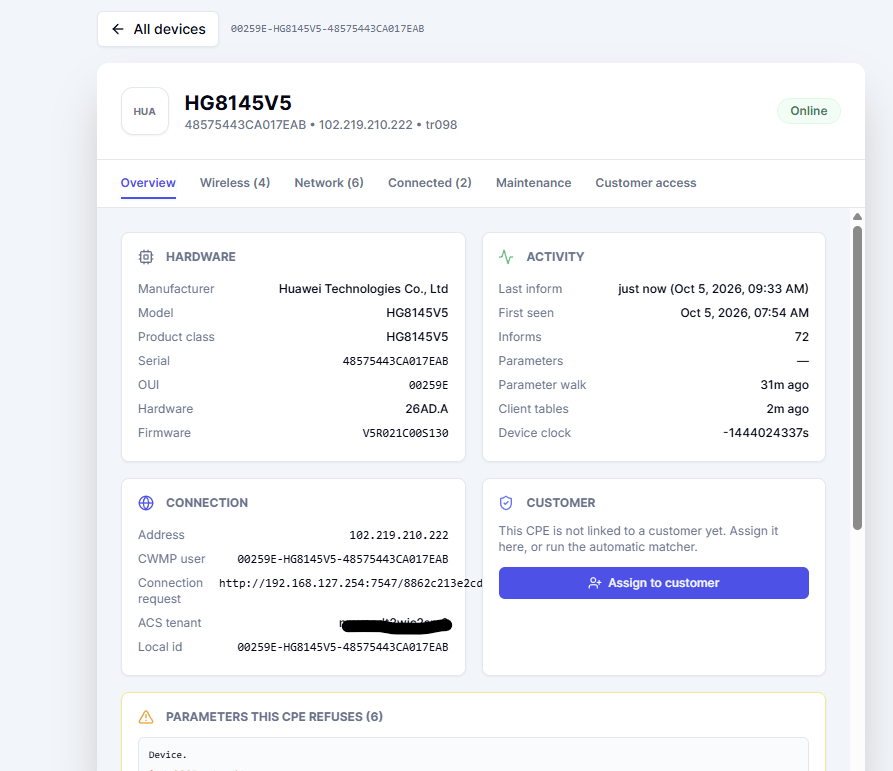 Each device page has tabs for what it reported:
| Tab | Contents |
| - | - |
| **Overview** | Identity, firmware, uptime and the last inform |
| **Wireless** | The Wi-Fi networks on the CPE and their settings |
| **Network** | WAN connections, LAN gateway, DHCP server, DNS and host count |
| **Connected** | The clients currently attached to the CPE |
| **Maintenance** | Refresh, reboot and parameter operations |
| **Customer access** | What the customer may see and change from their portal |
Each device page has tabs for what it reported:
| Tab | Contents |
| - | - |
| **Overview** | Identity, firmware, uptime and the last inform |
| **Wireless** | The Wi-Fi networks on the CPE and their settings |
| **Network** | WAN connections, LAN gateway, DHCP server, DNS and host count |
| **Connected** | The clients currently attached to the CPE |
| **Maintenance** | Refresh, reboot and parameter operations |
| **Customer access** | What the customer may see and change from their portal |
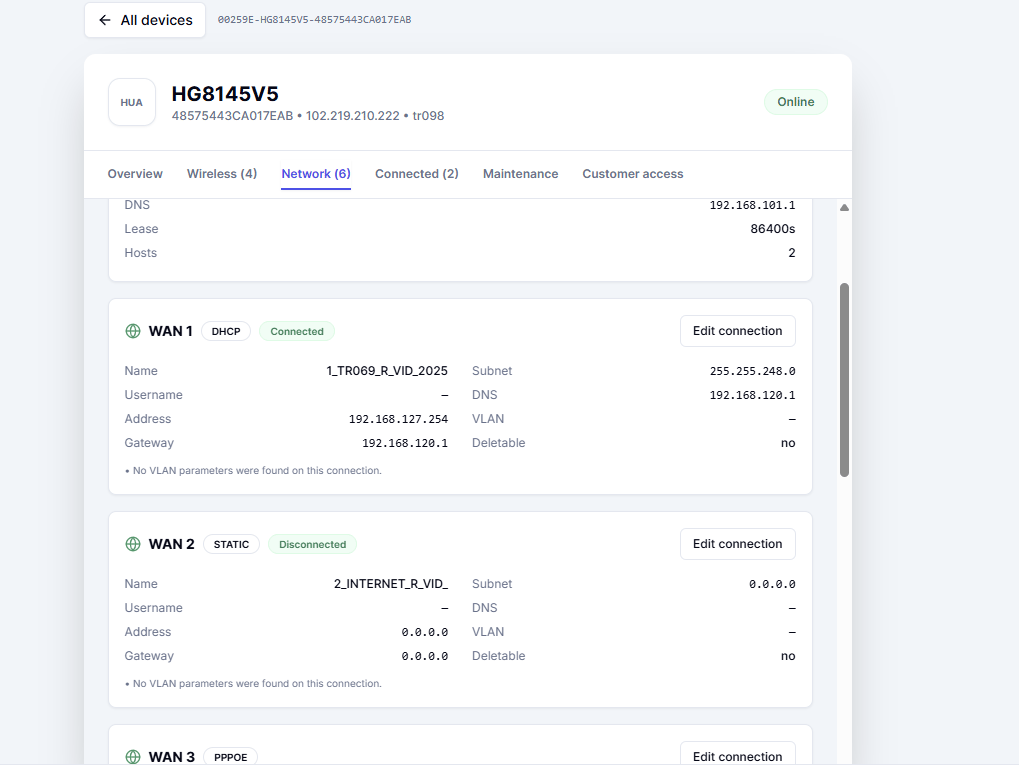 On the **Network** tab the TR-069 WAN profile is easy to spot — a name such as `1_TR069_R_VID_` with an address inside the ACS DHCP pool. If that interface has no address, the CPE never reached the ACS.
***
## Provision the ACS network on a MikroTik
Press **Provision MikroTik** on the dashboard, pick the router, and LipaNet builds the whole management network on it.
On the **Network** tab the TR-069 WAN profile is easy to spot — a name such as `1_TR069_R_VID_` with an address inside the ACS DHCP pool. If that interface has no address, the CPE never reached the ACS.
***
## Provision the ACS network on a MikroTik
Press **Provision MikroTik** on the dashboard, pick the router, and LipaNet builds the whole management network on it.
 ### Settings
| Field | Notes |
| - | - |
| **Provision this ACS network on the router** | Off removes the VLAN, pool, DHCP and NAT rules again |
| **Save to** | Apply to this router only, or save as the tenant-wide default |
| **Management network** | A private `/16`–`/25` whose first host becomes the gateway |
| **VLAN id** | 1–4094, default `2025` |
| **Periodic inform (s)** | Never below `100` — smaller values make the ACS reject and blacklist the device |
| **Parent interface** | The bridge or interface the ACS VLAN is created on |
| **Upload / Download limit** | Optional bandwidth cap for the management subnet |
| **DHCP DNS servers** | Handed to the CPEs on the management VLAN |
| **Internal notes** | Free text for your own records |
Only **free** ranges are offered. The picker lists subnets that do not overlap the OpenVPN, WireGuard, hotspot, static or PPPoE ranges on that router, and picking one fills the field for you.
### Settings
| Field | Notes |
| - | - |
| **Provision this ACS network on the router** | Off removes the VLAN, pool, DHCP and NAT rules again |
| **Save to** | Apply to this router only, or save as the tenant-wide default |
| **Management network** | A private `/16`–`/25` whose first host becomes the gateway |
| **VLAN id** | 1–4094, default `2025` |
| **Periodic inform (s)** | Never below `100` — smaller values make the ACS reject and blacklist the device |
| **Parent interface** | The bridge or interface the ACS VLAN is created on |
| **Upload / Download limit** | Optional bandwidth cap for the management subnet |
| **DHCP DNS servers** | Handed to the CPEs on the management VLAN |
| **Internal notes** | Free text for your own records |
Only **free** ranges are offered. The picker lists subnets that do not overlap the OpenVPN, WireGuard, hotspot, static or PPPoE ranges on that router, and picking one fills the field for you.
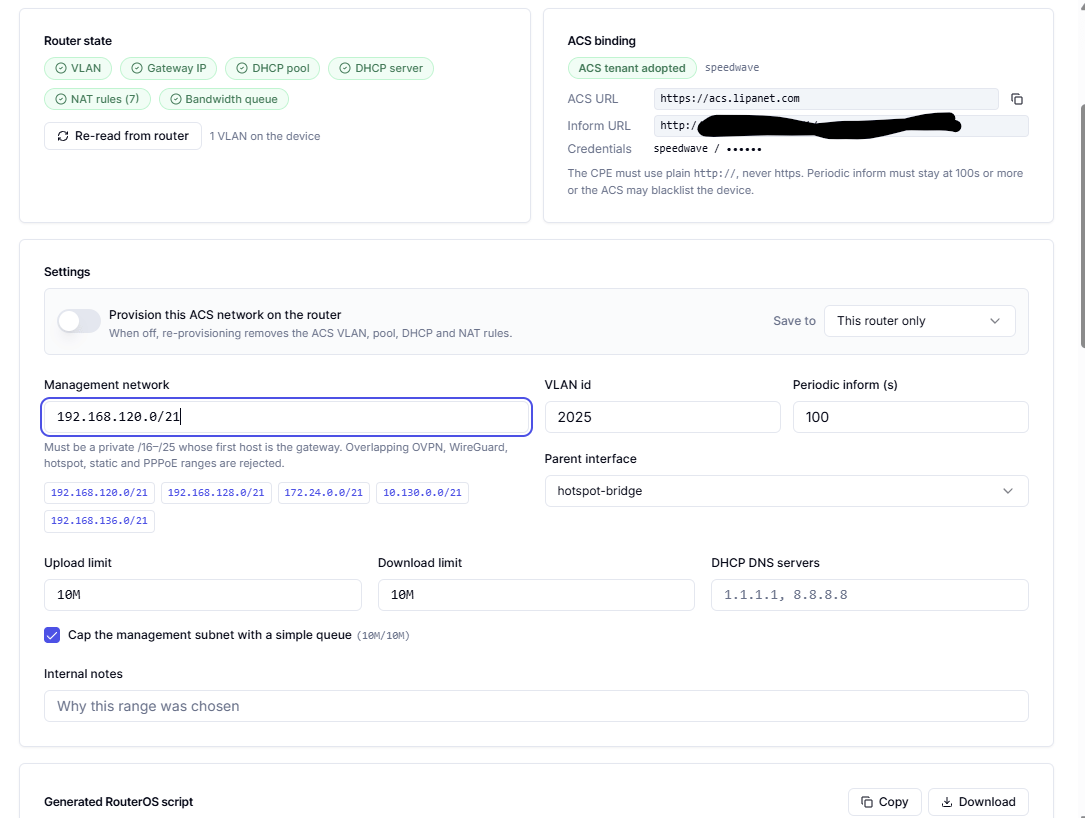 A range that overlaps anything already in use is rejected outright, so the ACS network can never take an address away from a customer or a tunnel.
### Preview and apply
The preview shows every command that will run, the RouterOS script and the exact objects that will be created:
* an `/interface vlan` tagged with the VLAN id, on the parent interface
* the gateway `/ip address` on that VLAN
* the `/ip pool` for the CPE addresses
* an `/ip dhcp-server` and its `/ip dhcp-server/network`
* `srcnat` masquerade rules for the management subnets
* an optional `/queue/simple` for the bandwidth cap
Apply runs them on the router and records the run in **Apply history**. Removing the network runs the same objects in reverse.
***
## What customers may change
The **Customer access** tab of a device decides what the customer sees in their portal (**/cp** → **My router**).
| Capability | Effect |
| - | - |
| **See the Wi-Fi networks** | Without it the customer's Wi-Fi section stays empty |
| **Change Wi-Fi** | Rename a network or change its password |
| **See connected devices** | The LAN/Wi-Fi client list |
| **Reboot the router** | Drops the customer's internet for about a minute |
| **Refresh the router** | Re-reads parameters without a reboot |
Every capability can be **Inherit**, **Allow** or **Deny**, and **Wi-Fi visible by default** controls new networks. Networks that are not marked visible stay on the device and are hidden from the customer.
A range that overlaps anything already in use is rejected outright, so the ACS network can never take an address away from a customer or a tunnel.
### Preview and apply
The preview shows every command that will run, the RouterOS script and the exact objects that will be created:
* an `/interface vlan` tagged with the VLAN id, on the parent interface
* the gateway `/ip address` on that VLAN
* the `/ip pool` for the CPE addresses
* an `/ip dhcp-server` and its `/ip dhcp-server/network`
* `srcnat` masquerade rules for the management subnets
* an optional `/queue/simple` for the bandwidth cap
Apply runs them on the router and records the run in **Apply history**. Removing the network runs the same objects in reverse.
***
## What customers may change
The **Customer access** tab of a device decides what the customer sees in their portal (**/cp** → **My router**).
| Capability | Effect |
| - | - |
| **See the Wi-Fi networks** | Without it the customer's Wi-Fi section stays empty |
| **Change Wi-Fi** | Rename a network or change its password |
| **See connected devices** | The LAN/Wi-Fi client list |
| **Reboot the router** | Drops the customer's internet for about a minute |
| **Refresh the router** | Re-reads parameters without a reboot |
Every capability can be **Inherit**, **Allow** or **Deny**, and **Wi-Fi visible by default** controls new networks. Networks that are not marked visible stay on the device and are hidden from the customer.
 ***
## Set up a CPE
Use the guide for the brand the customer has:
* [Huawei HG8145V5 and similar](/networking/cpe-setup/huawei)
* [ZTE F660, F670 and similar](/networking/cpe-setup/zte)
* [Generic TR-069 CPE](/networking/cpe-setup/generic)
Each page lists the exact URL, credentials, VLAN and inform interval to enter, step by step.
***
## Troubleshooting
**The CPE never appears.** Check the inform URL is `http://`, the inform interval is 100 seconds or more, the VLAN id on the CPE matches the one provisioned on the MikroTik, and the ACS VLAN, pool and DHCP server exist on the router.
**The CPE appears but stays offline.** Read its **Network** tab: the TR-069 WAN profile should hold an address inside the ACS pool. Nothing in the pool means the management VLAN is not reachable from the CPE.
**Never point a CPE at an `https://` ACS URL.** The TLS handshake fails, the inform never arrives, and the device may be blacklisted by the ACS after repeated failures.
***
## Related pages
* [Routers](/networking/routers)
* [IPv4 Networks](/networking/ipv4-networks)
* [My Devices](/networking/my-devices)
This documentation is built and hosted on [Mintlify](https://mintlify.com), a developer documentation platform.
***
## Set up a CPE
Use the guide for the brand the customer has:
* [Huawei HG8145V5 and similar](/networking/cpe-setup/huawei)
* [ZTE F660, F670 and similar](/networking/cpe-setup/zte)
* [Generic TR-069 CPE](/networking/cpe-setup/generic)
Each page lists the exact URL, credentials, VLAN and inform interval to enter, step by step.
***
## Troubleshooting
**The CPE never appears.** Check the inform URL is `http://`, the inform interval is 100 seconds or more, the VLAN id on the CPE matches the one provisioned on the MikroTik, and the ACS VLAN, pool and DHCP server exist on the router.
**The CPE appears but stays offline.** Read its **Network** tab: the TR-069 WAN profile should hold an address inside the ACS pool. Nothing in the pool means the management VLAN is not reachable from the CPE.
**Never point a CPE at an `https://` ACS URL.** The TLS handshake fails, the inform never arrives, and the device may be blacklisted by the ACS after repeated failures.
***
## Related pages
* [Routers](/networking/routers)
* [IPv4 Networks](/networking/ipv4-networks)
* [My Devices](/networking/my-devices)
This documentation is built and hosted on [Mintlify](https://mintlify.com), a developer documentation platform.