> ## Documentation Index
> Fetch the complete documentation index at: https://wiki.lipanet.com/llms.txt
> Use this file to discover all available pages before exploring further.
# IP Bindings
> Manage hotspot bypass devices from the Networking sidebar, including expiry, renewal, restore, profiles, and hotspot manual queue cleanup.
# IP Bindings
Use **IP Bindings** to manage hotspot bypass devices from one page.
You can:
* select a router
* add or edit a binding
* set expiry
* set renewal amount and renewal duration
* send a renewal link
* restore an expired binding
* use reusable profiles
This page is for hotspot device bindings. It is different from customer plan provisioning and different from IP address management.
***
## Where to Find It
**Navigate to:** Sidebar -> **Networking** -> **IP Bindings**
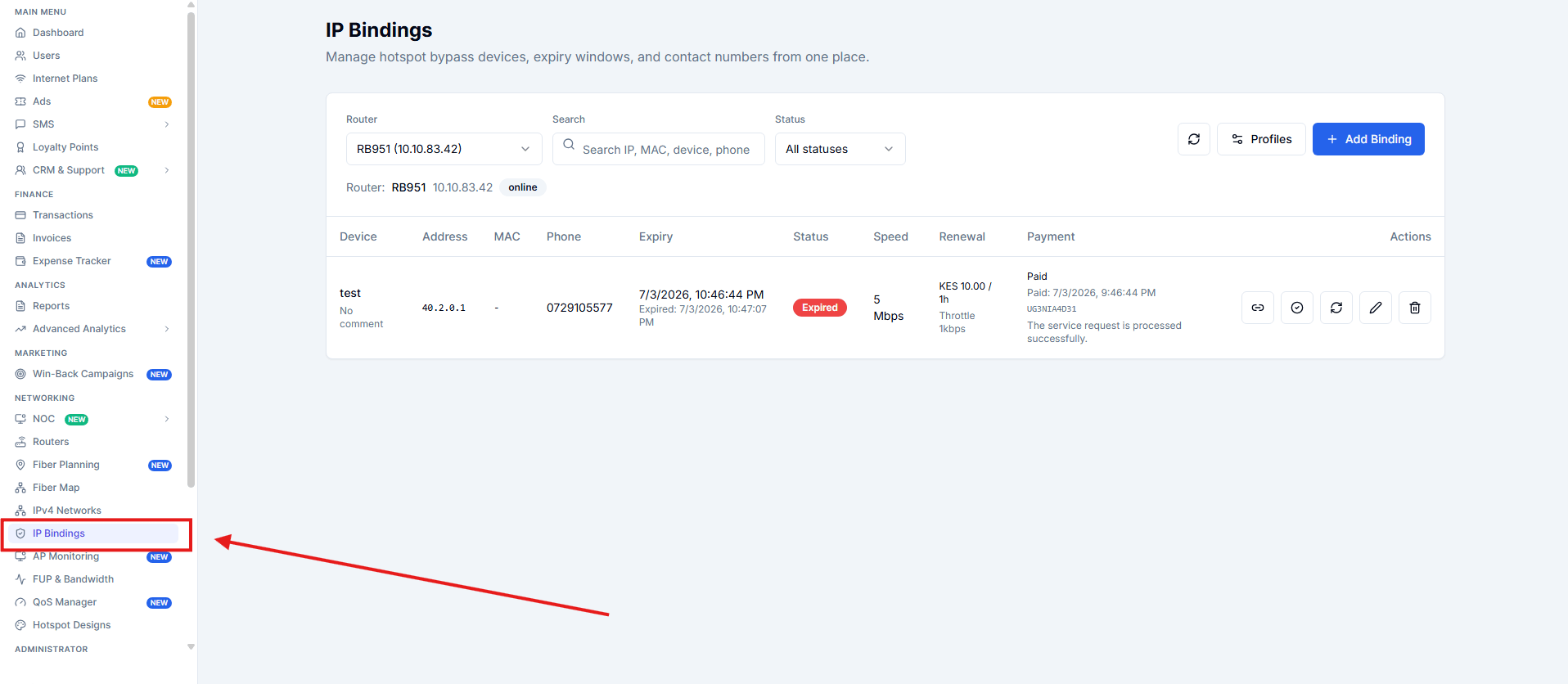 Route:
* `/networking/ip-bindings`
***
## Before You Start
Select the router you want to work on from the **Router** dropdown at the top of the page.
The page then loads bindings for that router.
***
## Add a Binding
Click **Add Binding**.
### Fields
| Field | What it does | |
| --------------------------------- | ------------------------------------- | - |
| **IP Address** | Device IP address | |
| **MAC Address** | Device MAC address | |
| **Phone Number** | Number used for renewal SMS | |
| **Device Name** | Friendly device label | |
| **Shortcut** | Short internal reference | |
| **Hotspot Server** | Hotspot server, usually `all` | |
| **Expiry** | When the binding should expire | |
| **Comment** | Internal note | |
| **Renewal Amount (KES)** | Amount to pay for renewal | |
| **Renewal Duration (Hours)** | How long renewed access lasts | |
| **Expiry Action** | What happens when the binding expires | |
| **Limit speed with simple queue** | Enables speed limiting | |
| **Speed (Mbps)** | Speed used when limiting is enabled | |
Route:
* `/networking/ip-bindings`
***
## Before You Start
Select the router you want to work on from the **Router** dropdown at the top of the page.
The page then loads bindings for that router.
***
## Add a Binding
Click **Add Binding**.
### Fields
| Field | What it does | |
| --------------------------------- | ------------------------------------- | - |
| **IP Address** | Device IP address | |
| **MAC Address** | Device MAC address | |
| **Phone Number** | Number used for renewal SMS | |
| **Device Name** | Friendly device label | |
| **Shortcut** | Short internal reference | |
| **Hotspot Server** | Hotspot server, usually `all` | |
| **Expiry** | When the binding should expire | |
| **Comment** | Internal note | |
| **Renewal Amount (KES)** | Amount to pay for renewal | |
| **Renewal Duration (Hours)** | How long renewed access lasts | |
| **Expiry Action** | What happens when the binding expires | |
| **Limit speed with simple queue** | Enables speed limiting | |
| **Speed (Mbps)** | Speed used when limiting is enabled | |
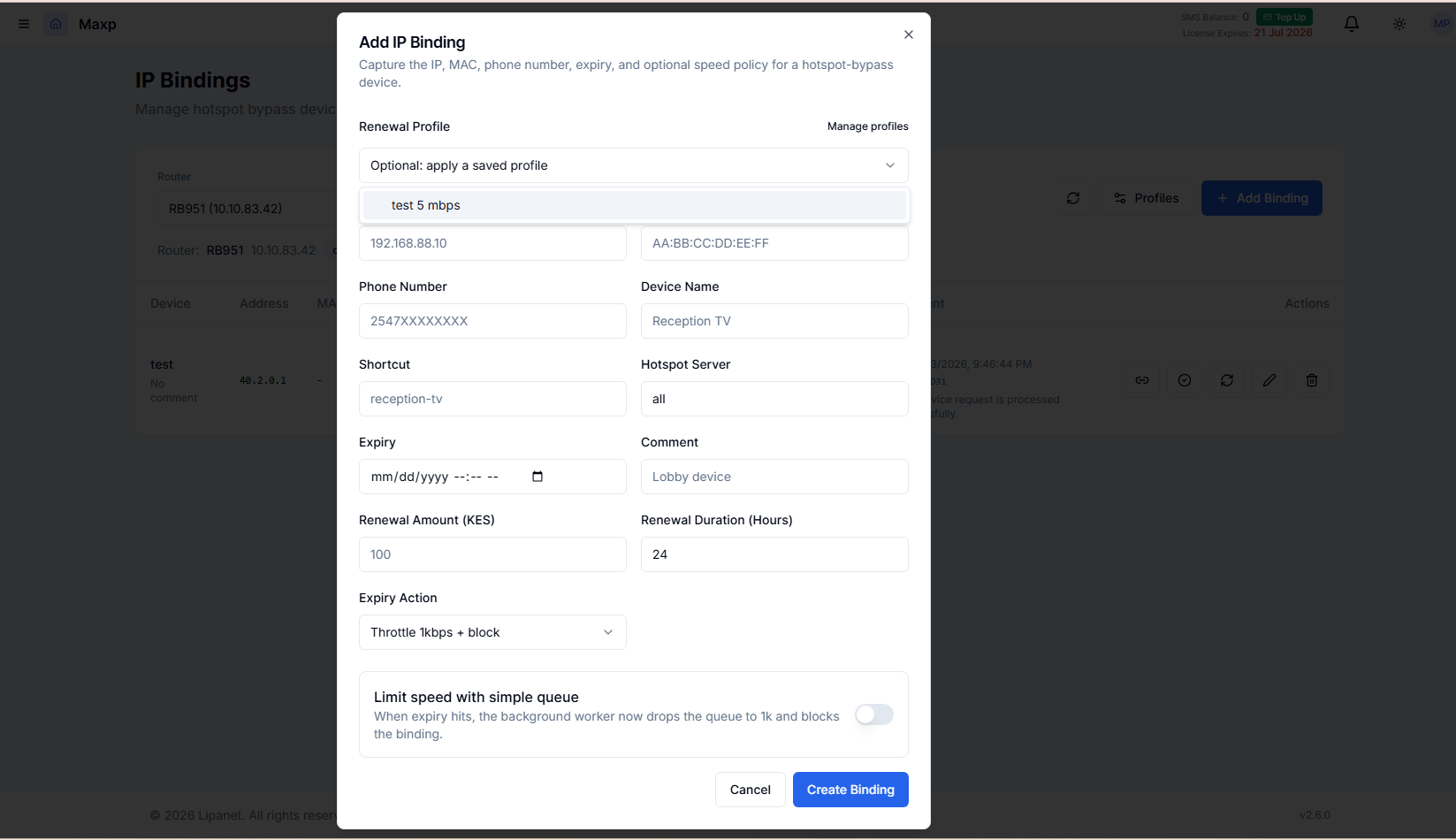 \
Expiry Actions
* `Throttle 1kbps + block`
* `Block only`
* `Remove binding`
***
## Binding Profiles
Use **Profiles** to save reusable binding settings for a router.\\
\
Expiry Actions
* `Throttle 1kbps + block`
* `Block only`
* `Remove binding`
***
## Binding Profiles
Use **Profiles** to save reusable binding settings for a router.\\
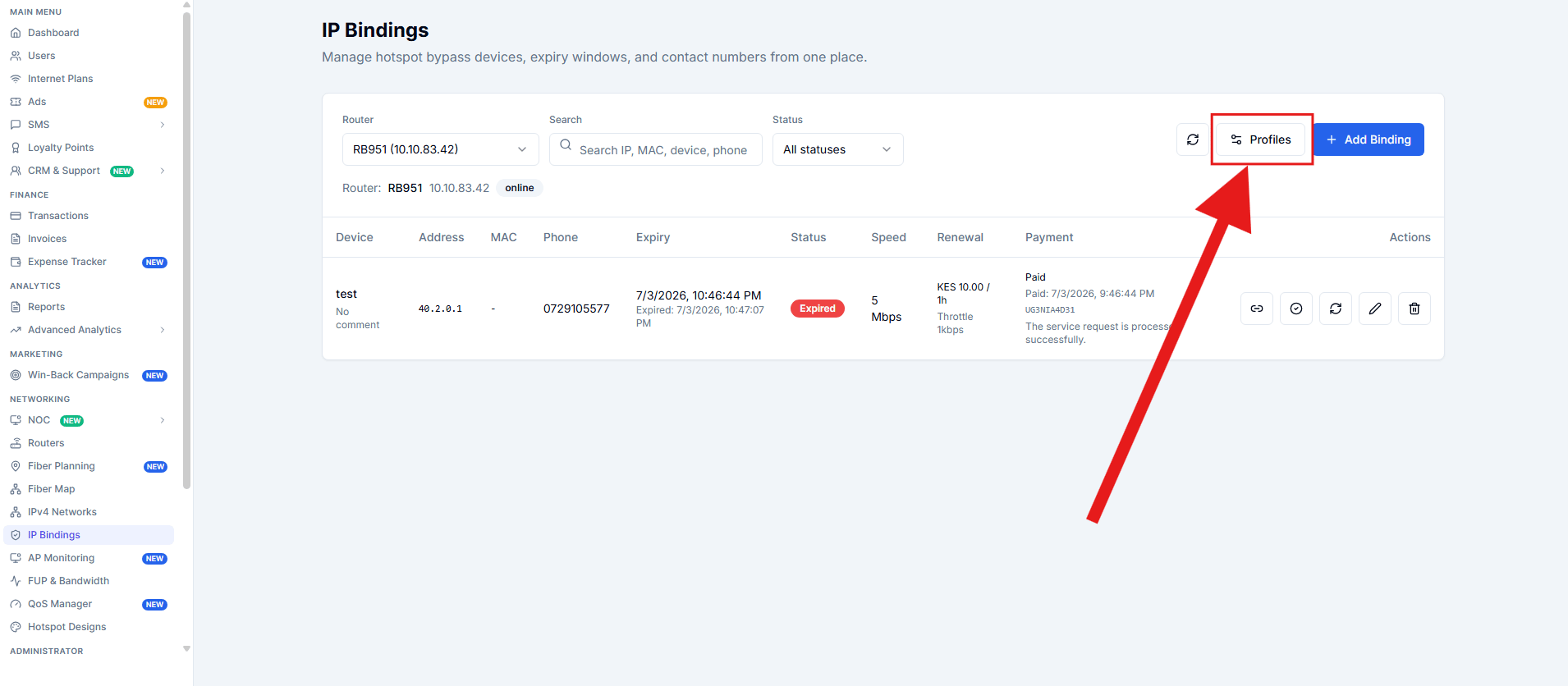 A profile can store:
* speed
* renewal amount
* renewal hours
* expiry action
* comment
This helps when you create the same type of device package repeatedly.\\
***
## Renewal Flow
If a binding has a phone number and renewal amount, you can send a renewal link.
Typical flow:
1. Binding expires.
2. User receives a renewal link by SMS.
3. User pays.
4. The binding is restored.
***
## Restore Options
Each binding can be restored from the actions column.
### Manual Restore
Use this when staff want to restore access directly.
### Reconcile Paid Restore
Use this when payment already succeeded but access still needs to be applied again.
***
## What You See in the Table
The bindings table shows:
* device
* IP address
* MAC address
* phone
* expiry
* status
* speed
* renewal details
* payment state
You can also:
* search bindings
* filter by status
* refresh the list
***
## Common Issues
| Issue | Fix |
| --------------------------------- | ---------------------------------------------- |
| No bindings are showing | Select a router first |
| Renewal link is disabled | Add both phone number and renewal amount |
| Binding cannot be saved | Enter a valid IP address and valid MAC if used |
| Access is still off after payment | Use restore or reconcile paid restore |
***
## Related Pages
* [Routers](/add-and-configure-mikrotik)
* [Self portal login](/self-portal-login)
* [Payment Gateways](/gateways/payment)
A profile can store:
* speed
* renewal amount
* renewal hours
* expiry action
* comment
This helps when you create the same type of device package repeatedly.\\
***
## Renewal Flow
If a binding has a phone number and renewal amount, you can send a renewal link.
Typical flow:
1. Binding expires.
2. User receives a renewal link by SMS.
3. User pays.
4. The binding is restored.
***
## Restore Options
Each binding can be restored from the actions column.
### Manual Restore
Use this when staff want to restore access directly.
### Reconcile Paid Restore
Use this when payment already succeeded but access still needs to be applied again.
***
## What You See in the Table
The bindings table shows:
* device
* IP address
* MAC address
* phone
* expiry
* status
* speed
* renewal details
* payment state
You can also:
* search bindings
* filter by status
* refresh the list
***
## Common Issues
| Issue | Fix |
| --------------------------------- | ---------------------------------------------- |
| No bindings are showing | Select a router first |
| Renewal link is disabled | Add both phone number and renewal amount |
| Binding cannot be saved | Enter a valid IP address and valid MAC if used |
| Access is still off after payment | Use restore or reconcile paid restore |
***
## Related Pages
* [Routers](/add-and-configure-mikrotik)
* [Self portal login](/self-portal-login)
* [Payment Gateways](/gateways/payment)